什麼是惡意軟體 HackTool:Win32/Keygen?如何去除?

您是否掃描過您的設備並發現它感染了 HackTool:Win32/Keygen?在您使用破解或金鑰產生器啟動進階軟體後,Windows Defender 可能會自動警告您有關此惡意軟體的存在。
在推出Windows 11時,微軟宣布該作業系統僅支援配備TPM 2.0安全晶片的電腦。據微軟稱,TMP 2.0是為 Windows Hello 和 BitLoker 提供安全性的關鍵元件。這有助於 Windows 11 更好地保護使用者的身分和資料。
為了幫助使用者和管理員輕鬆控制 TPM 上儲存的數據,Microsoft 增加了名為 TPM 診斷的工具。這是一個附加工具,因此要使用它,您首先需要安裝它。
若要在 Windows 11 上安裝和使用 TPM 診斷,請依照下列說明操作:
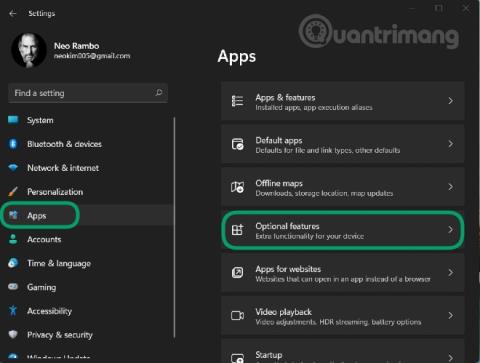
步驟 1:按Windows + I開啟「設定」,然後造訪左側欄中的「應用程式」部分
第 2 步:按一下選用功能
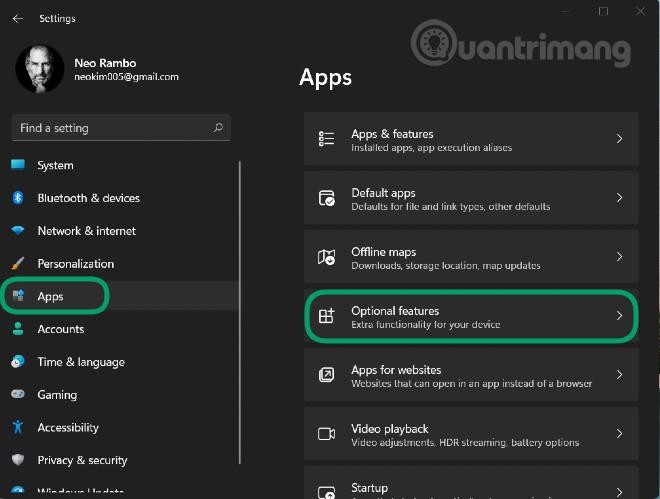
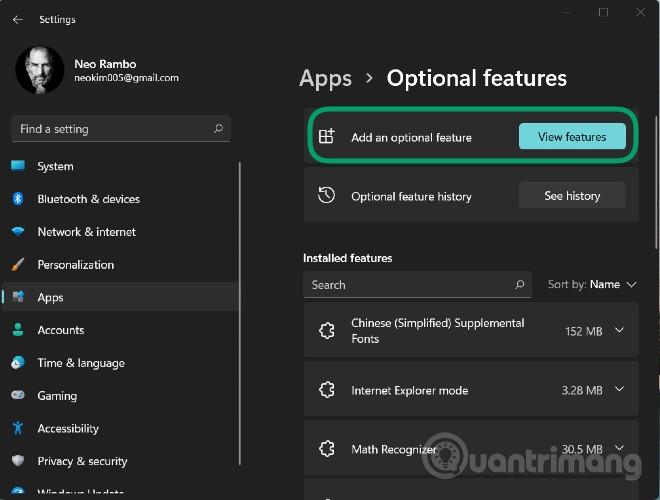
步驟 3:按一下“新增選用功能”部分中的“檢視功能”
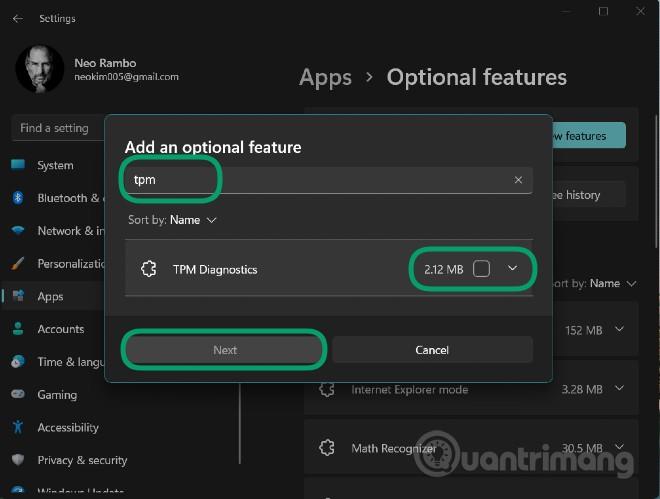
步驟 4:在搜尋框中輸入tpm ,然後按一下下圖所示的TPM 診斷工具旁邊的,然後按下一步 > 安裝以確認安裝
步驟5:等待系統安裝後,您可以透過Windows Terminal(Admin)命令視窗(命令提示字元的新名稱)使用TPM Diagnostics
步驟 6:按Windows + X開啟進階使用者選單,然後選擇Windows 終端機(管理員)
您可以在此輸入 TPM 診斷控制命令。例如,TpmDiagnostics.exe GetCapativity指令將列出電腦上 TPM 晶片的功能和設置,如下所示:
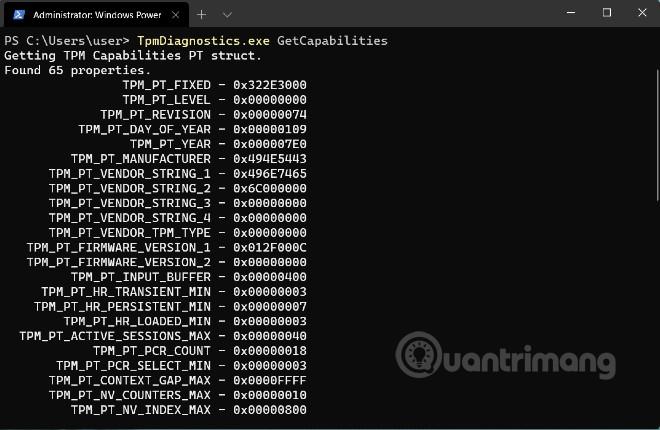
除了查詢儲存的安全金鑰和其他資訊之外,您還可以使用 TPM 診斷來編碼/解碼 Base64、十六進位和二進位檔案。
透過TPM Diagnostics,你可以了解到很多關於Windows 11基本安全機制的信息,不過,我們建議你如果不了解的話就不要過多「涉獵」這個TPM Diagnostics工具,要弄清楚它。如果配置不正確,您可能會遺失電腦操作所需的金鑰。
以下是 TPM 診斷工具中可用的所有命令的清單:
Flags:
	PrintHelp ( /h -h )
	PromptOnExit ( -x /x )
	UseECC ( -ecc /ecc )
	UseAes256 ( -aes256 /aes256 )
	QuietPrint ( -q /q )
	PrintVerbosely ( -v /v )

Use the 'help' command to get more information about a command.
Commands:

TpmInfo:
	GetLockoutInfo
	IsOwned
	PlatformType
	CheckFIPS
	ReadClock
	GetDeviceInformation
	IfxRsaKeygenVulnerability
	GatherLogs [full directory path]
	PssPadding
	IsReadyInformation

TpmTask:
	MaintenanceTaskStatus
	ShowTaskStatus
	IsEULAAccepted
	ProvisionTpm [force clear] [allow PPI prompt]

TpmProvisioning:
	PrepareTPM
	CanUseLockoutPolicyClear
	CanClearByPolicy

AutoProvisioning:
	IsAutoProvisioningEnabled
	EnableAutoProvisioning
	DisableAutoProvisioning [-o]

EK:
	EkInfo
	ekchain
	EkCertStoreRegistry
	GetEkCertFromWeb [-ecc] [cert file]
	GetEkCertFromNVR [-ecc] [cert file]
	GetEkCertFromReg [-ecc] [ output file ]
	GetEk [-ecc] [key file]
	CheckEkCertState
	InstallEkCertFromWeb
	InstallEkCertFromNVR
	InstallEkCertThroughCoreProv
	EKCertificateURL

WindowsAIK:
	InstallWindowsAIK [-skipCert]
	WinAikPersistedInTpm
	UninstallWindowsAIKCert
	GetWindowsAIKCert [cert file]
	IsWindowsAIKInstalledInNCrypt
	EnrollWindowsAIKCert
	GetWindowsAIKPlatformClaim ["fresh"] [output file]

OtherKeys:
	PrintPublicInfo [ srk / aik / ek / handle ] [-asBcryptBlob / -RsaKeyBitsOnly / -RsaSymKeyBitsOnly] [-ecc]
	TestParms [ SYMCIPHER | RSA ] [ algorithm specific arguments ]
	EnumerateKeys

NVStorage:
	EnumNVIndexes
	DefineIndex [index] [size] [attribute flags]
	UndefineIndex [index]
	ReadNVIndexPublic [index]
	WriteNVIndex [index] [data in hex format | -file filename]
	ReadNVIndex [index]
	NVSummary

NVBootCounter:
	CheckBootCounter
	ReadBootCounter [/f]

PCRs:
	PrintPcrs

PhysicalPresence:
	GetPPTransition
	GetPPVersionInfo
	GetPPResponse
	GetPPRequest

TPMCommandsAndResponses:
	CommandCode [hex command code]
	ResponseCode [hex response code]

Tracing:
	EnableDriverTracing
	DisableDriverTracing
	FormatTrace [etl file] [output json file]

DRTM:
	DescribeMle [MLE Binary File]

Misc:
	Help [command name]
	DecodeBase64File [file to decode from base 64]
	EncodeToBase64File [file to encode]
	ReadFileAsHex [file to read]
	ConvertBinToHex [file to read] [file to write to]
	ConvertHexToBin [file to read] [file to write to]
	Hash [hex bytes or raw value to hash]
GetCapabilities您是否掃描過您的設備並發現它感染了 HackTool:Win32/Keygen?在您使用破解或金鑰產生器啟動進階軟體後,Windows Defender 可能會自動警告您有關此惡意軟體的存在。
探索如何在Windows 10上建立和管理還原點,這是一項有效的系統保護功能,可以讓您快速還原系統至先前狀態。
您可以使用以下 15 種方法輕鬆在 Windows 10 中開啟<strong>裝置管理員</strong>,包括使用命令、捷徑和搜尋。
很多人不知道如何快速顯示桌面,只好將各個視窗一一最小化。這種方法對於用戶來說非常耗時且令人沮喪。因此,本文將向您介紹Windows中快速顯示桌面的十種超快速方法。
Windows Repair 是一款有效的 Windows 錯誤修復工具,幫助使用者修復與 Internet Explorer、Windows Update 和其他重要程式相關的錯誤。
您可以使用檔案總管選項來變更檔案和資料夾的工作方式並控制顯示。掌握如何在 Windows 10 中開啟資料夾選項的多種方法。
刪除不使用的使用者帳戶可以顯著釋放記憶體空間,並讓您的電腦運行得更流暢。了解如何刪除 Windows 10 使用者帳戶的最佳方法。
使用 bootsect 命令能夠輕鬆修復磁碟區引導程式碼錯誤,確保系統正常啟動,避免 hal.dll 錯誤及其他啟動問題。
存檔應用程式是一項功能,可以自動卸載您很少使用的應用程序,同時保留其關聯的檔案和設定。了解如何有效利用 Windows 11 中的存檔應用程式功能。
要啟用虛擬化,您必須先進入 BIOS 並從 BIOS 設定中啟用虛擬化,這將顯著提升在 BlueStacks 5 上的效能和遊戲體驗。


